Menu
What TV to buy in 2026? We updated the rating and figured out the characteristics
GUIDE
Which TV to buy in 2026? Updated the rating and clarified the specifications
Choosing a new TV and drowning in dozens of models, technologies, and marketing terms? In this article we will briefly and clearly explain the key parameters for independent selection. And for those who need a ready answer, we have updated the TV rating based on orders in the Onlíner Catalog — you can use it as a reference for others' choices.
Tips for choosing a TV: what to pay attention to
Which diagonal to choose?
Resolution
Panel type
How RGB mini
Which screen size should you choose?
The choice of screen size depends on the distance from which you plan to watch the TV. If you choose a screen that is too large for a small room, you’ll literally have to turn your head while watching content. If the screen is too small, the enjoyment of watching may also decrease.
For a screen size of 50–60 inches, the optimal viewing distance is about 2–3 meters. For sizes larger than 60 inches, it is more comfortable to keep a distance of at least 3 meters.
Resolution
The larger the TV’s diagonal, the higher the resolution you should choose. Almost all models from 50 inches and up already come with 4K, so this rule is especially relevant for a 43‑inch screen: you may find options with both FHD and 4K.
The same logic applies to 32‑inch models: FHD (1920×1080) will look noticeably better than HD (1366×768). However, it is important to understand that streaming TV, depending on the channel’s quality, may still look poor.
Panel type
Televisions use several different panel types: IPS, VA, and OLED. Many manufacturers do not specify the panel type on their official websites, and the same model may have different panels depending on the screen size and the factory where it was assembled.
IPS offers wide viewing angles and saturated colors, but the backlight can “bleed” at the edges, especially noticeable in dark scenes.
VA provides
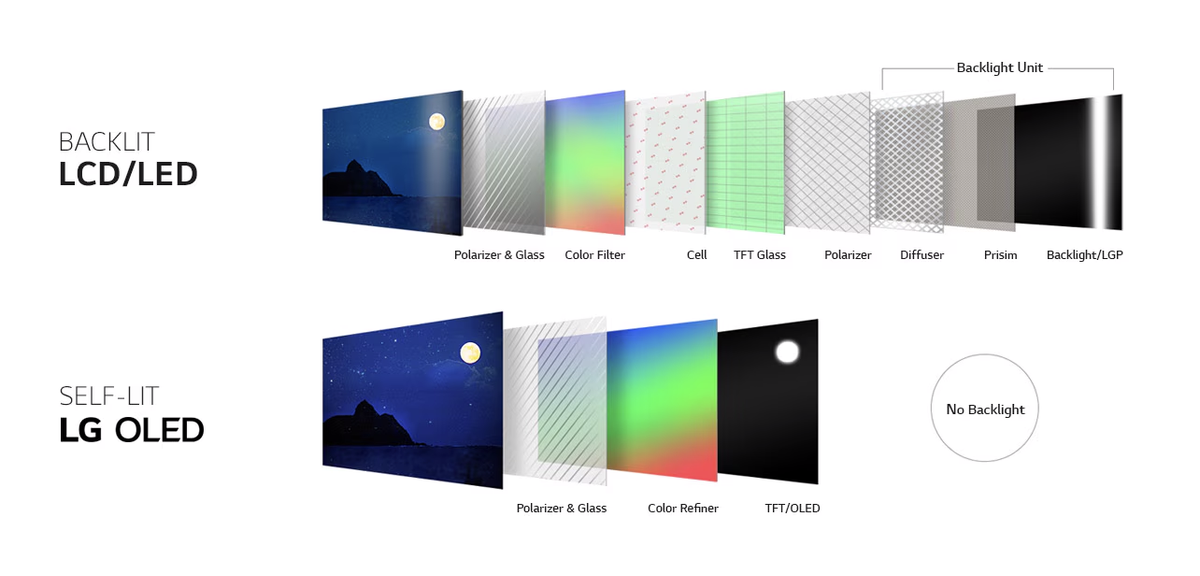
miniLED is the next stage in the development of conventional LED TVs. Instead of edge lighting or separate LED strips behind the screen, thousands of mini LEDs are used here. They are combined into "lighting zones", each of which can be turned off at the right moment to produce a deeper black color. The more LEDs and zones there are, the more even the lighting is.
In OLED, each pixel emits its own light and can be completely turned off, creating a truly black color. In this regard, the technology remains "ideal", but modern miniLEDs are gradually approaching it in terms of lighting evenness and black depth.
RGB miniLED can be seen as a more complex development of conventional miniLED backlighting. This is not OLED and not MicroLED: the image is still formed by an LCD matrix, and the light is provided by miniature inorganic LEDs located behind the screen. The main difference is that instead of white or blue miniLED LEDs with additional layers for color formation, separate red, green, and blue LEDs are used here, combined into manageable RGB modules.
The image is from the Youtube channel OLED SPACE by LG Display.
What is QLED and quantum dots
QLED is a marketing name for the technology that uses a layer with quantum dots. In conventional TVs, the backlight passes through three color filters, which cut off excess light, creating the desired shade.
Quantum dots do not cut off light, but convert it into the desired wavelength. By changing the size of the dot, manufacturers get more saturated colors. Combining this with even miniLED backlighting, we get almost an ideal formula for a modern TV in 2026.
The frequency of screen updates
For movies and TV series, a frequency of 60 Hz is sufficient. But if you plan to connect a set-top box or PC, models with a frequency of 120-144 Hz will be optimal. With a high update frequency, frame synchronization technologies such as AMD Freesync and HDMI VRR work better, reducing "tearing" of the image.
Dolby Vision
Dolby Vision is an advanced version of HDR that transmits dynamic metadata along with the video stream. The TV receives precise instructions for each frame: what brightness range to use, how to correctly convey colors, and where to preserve details in light and shadows. Due to this adaptation, the picture looks as close as possible to what the authors intended during mastering.
Dolby Vision IQ repeats the formula but uses a light sensor and adjusts the image to real conditions: bright daylight, evening twilight, or glare from lamps. Details remain readable - shadows do not "fall through," and light elements are not lost even with strong external glare.
Dolby Vision 2 is a fully new generation of Dolby Vision, where the TV more accurately adapts the HDR signal to the capabilities of its panel and viewing conditions. The updated tone mapping (brightness adaptation) should better distribute brightness in complex scenes: preserve details in shadows, not overexpose bright objects, and maintain color saturation. Dolby Vision 2 Max is a version for top-end TVs, designed for models with a high margin of brightness, contrast, and color gamut. It should fully reveal the capabilities of such panels and additionally work with motion at the level of individual scenes, reducing jerks without excessive smoothing.
Gaming features
TVs with a frequency of 120-144 Hz can be considered gaming TVs. Usually, such models have support for AMD Freesync, G-sync compatible, and HDMI VRR. These technologies allow you to do without the built-in vertical sync in the game and reduce "tearing" of the image.
The Catalog already has many models that claim a maximum frequency of 144 Hz. In such TVs, the maximum frequency will only be achieved when connected to a PC. On the current generation of Xbox and PlayStation consoles, the maximum will be 120 Hz.
There are also functions that double the update frequency - from 60 to 120 Hz, from 120 to 240 Hz. In a 120 Hz matrix, the TV cannot physically output 240 frames, so "scanning" backlight is used. The screen is "divided" into several zones, and the backlight turns them on sequentially within one 120 Hz frame, rather than simultaneously. Due to this, the picture becomes smoother, and the eye perceives the update as more frequent - as if it were 200-240 Hz, although the panel itself remains 120 Hz. The picture when working with this function may look a bit "soapy".
Different manufacturers refer to this technology by their own names, but the principle of operation is the same. In the Catalog, a separate filter is provided for such models.
Image: youtube channel Geek Street
Location of the TV installation
When installing a TV on a stand, it is essential to consider its size and the arrangement of the legs. If the model has one central stand (example), there are usually no problems. However, if the legs are located on the edges of the body (example), they may simply not fit on the stand. Therefore, measure its width in advance and compare it with the dimensions of the TV.
TV Rating
In this part of the material, we will try to briefly tell you about each model from the top 10.
10th place - LG QNED evo AI QNED83 65QNED83B6A - from 2765 rubles
The 65-inch LG is suitable for those who choose a large screen for movies and consoles, and want to control the TV with a familiar remote control. Here, webOS 26, a central stand, and a panel with native 120 Hz, which supports VRR up to 144 Hz, are available. For PS5 and Xbox, modes up to 120 Hz are relevant; the upper frequency will come in handy when connecting a compatible PC.
In the general group of reviews of QNED83 of different diagonals, owners more often praise the image, smoothness, and Magic Remote. The 65-inch version itself has a positive review of color reproduction and control. For movies, it is worth considering the limitation: LG indicates HDR10 and HLG, Dolby Vision is not available in this model.
9th place - Xiaomi TV A Pro 43" 2026 L43MB-APRU (international version) - from 1013 rubles
The 43-inch A Pro is an option for a bedroom or small living room, where a 55-inch TV already takes up too much space. Here, you get full 4K and QLED, so compactness does not require compromising on HD resolution, like the junior 32-inch model. The panel works at 60 Hz, and the Android platform provides a familiar set of applications for movies and TV.
In reviews of the 43-inch version, people praise the clarity of the image, simple setup, and sound. However, impressions of performance vary: along with satisfied owners, there are complaints about long launch times, command delays, and application crashes. Judging by the available online review of the 43-inch model, the speaker volume is sufficient, but the sound depth is not always enough. For an evening series, this may be enough, but for movies with expressive bass, separate acoustics will be required.
8th place - Xiaomi TV A 50" 2026 L50MB-ARU (international version) - from 1089 rubles
In this top ten, this is the most affordable TV with a diagonal of over 50 inches. The basic A series offers 4K and 60 Hz without quantum dots and local dimming. It makes sense to consider it primarily for TV broadcasts, YouTube, and series, when it's more important to get a large screen for a moderate amount than to delve into HDR capabilities.
The owners of the 50-inch version in the Catalog are mostly satisfied with the price, image, and sound ratio. There is also a story with a non-working remote control pairing: after replacing the device, the same buyer updated the review and reported that everything worked. Among the household limitations, there is only one USB port: if it's occupied by a storage device, a splitter will be needed for another USB device.
In 7th place is the LG QNED evo AI QNED83 55QNED83B6A, starting at 2248 rubles. The 55-inch QNED83 is interesting for its combination of a gaming screen and controls: 4K at 120 Hz, VRR up to 144 Hz for compatible PCs, webOS 26, and Magic Remote with a pointer. The central leg can also be an argument when choosing, especially if it's inconvenient to place a TV with widely spaced legs on a shelf.
In reviews of the 55-inch version, praise for smoothness, game graphics, and interface convenience is repeated. At the same time, there are comments about the plastic body and stand, and one of the owners was dissatisfied with the built-in sound and preferred a soundbar. LG does not declare Dolby Vision support for this model: if the film library is collected in this format, it's worth considering this moment before purchasing.
In 6th place is the Xiaomi TV S Pro Mini LED 55" 2026 L55MB-SRU (international version), starting at 2176 rubles. The S Pro has what the regular S Mini LED lacks: 4K at 144 Hz and VRR for games without image tearing. The manufacturer claims 408 dimming zones and anti-glare coating. However, choosing this model based solely on the list of technologies would be rash: in our February review, the TV performed well in regular HDR and games, but noticeably lost details in dark scenes in Dolby Vision. This conclusion applies to the firmware on which that test was conducted.
In reviews of the series, people praise the brightness, contrast, and game graphics. There are also complaints about the software part: slowdowns, freezes, and the need to restart. The remote control is not liked by everyone either. The 55-inch version has both satisfied owners and buyers with these comments, so the brightness reserve and gaming capabilities should be evaluated together with the software features.
In 5th place is the Xiaomi TV A Pro 32" 2026 L32MB-APRU (international version), starting at 612 rubles.
The smallest and most affordable participant in the rating. Despite the A Pro name, this is a completely different TV compared to its 43- and 55-inch relatives: the resolution here is only 1366×768. It is suitable for a kitchen or watching TV from a short distance.
Both reviews in the Catalog pertain to this particular diagonal: buyers purchased the TV for their kitchen and were satisfied with the picture, sound, and control. One of them would have liked the menu to be a bit faster. Judging by the review available online, the model handles regular viewing, but when switching