Menu
IPS, miniLED or OLED? We've figured out all the monitors for you
Source: Pavel Kupchenya
A monitor can be purchased as a leftover after assembling a computer and then used for years, with daily usage of up to eight hours. However, models for work, gaming, MacBook, or color correction can differ significantly more than it seems after reading the description. Let's figure out which monitor is needed for different tasks, which characteristics are worth paying extra for, and which models are currently most often ordered in the Onlíner Catalog.
About this article
The most ordered monitor brands right now
What to pay attention to when choosing a monitor
Criteria for selecting models
Inexpensive monitors for study and work
Gaming FHD monitors
Gaming 2K monitors
Gaming 4K monitors
Wide-format monitors (21:9)
Curved monitors
Professional monitors for color correction, photo processing, and design
Monitors for MacBook
Monitors for cyber sports in CS2
miniLED monitors
OLED monitors
This article was previously published on Onlíner. We updated and supplemented it in September 2026. The monitor guide has become even more accurate and relevant.
The most ordered monitors right now
According to orders in the Onlíner Catalog from June 1 to September 20, 2026.
Xiaomi 2K Gaming Monitor G27Qi 2026 P27QDB-RGGL (international version)
LG UltraGear 24G411A-B
LG UltraGear 27G411A-B
LG UltraGear 27G610A-B
Xiaomi Redmi Gaming Monitor G27Q P27QDA-RG (Chinese version)
Xiaomi Gaming Monitor G27i 2026 P27FDA-RGGL (international version)
Xiaomi Gaming Monitor G24i 2026 P24FDA-RGGL (international version)
MSI MAG 244F
Xiaomi Redmi Gaming Monitor G24 P24FCA-RG (Chinese version)
Xiaomi Redmi G Pro 27Q P27QDA-RGP (Chinese version)
Xiaomi is the leader in orders in the Onlíner Catalog with a significant margin - 28.9% of all orders are for monitors from this company. The second place is occupied by LG with a result of 18.7%. The top five most ordered monitor brands are completed by AOC, MSI, and Gigabyte with shares of 9.7%, 6.8%, and 6.6%, respectively.
Among the ordered monitors, devices with a resolution of 1920×1080 are leading. A significant portion of orders consists of 2K models - their share is 40.5%. The resolution 3440×1440, used in wide-format monitors, and 4K panels occupy the third and fourth places with shares of 5.2% and 6.2%, respectively. Monitors with other resolutions account for less than 1% of orders.
What to pay attention to when choosing a monitor
Which type of panel to choose: VA, IPS, or OLED?
The choice of panel depends on your tasks:
VA. This type of panel offers high contrast and deep blacks, making it suitable for gaming and content consumption. However, VA panels are not ideal for work—due to the way these panels are constructed, fonts may appear less sharp.
IPS. It provides wider viewing angles and saturated colors, but has less pronounced contrast. It is suitable for both gaming and work.
OLED. The most advanced panel type. Each pixel emits light on its own, delivering infinite contrast, accurate color reproduction, and perfect blacks.
It is worth mentioning monitors with miniLED backlighting. This is not a panel type but a backlighting type. Unlike classic LED, miniLED uses many miniature LEDs grouped into backlight zones. Each zone can be turned off at the right moment, providing high contrast and perfect blacks.
A drawback of the technology is the “halo effect”—a characteristic glow around bright objects on a black background. The video below demonstrates this effect clearly:
What is color depth?
Color depth determines how many shades a monitor can display. The difference is most noticeable in gradients when transitioning from one shade to another—6‑bit panels exhibit banding
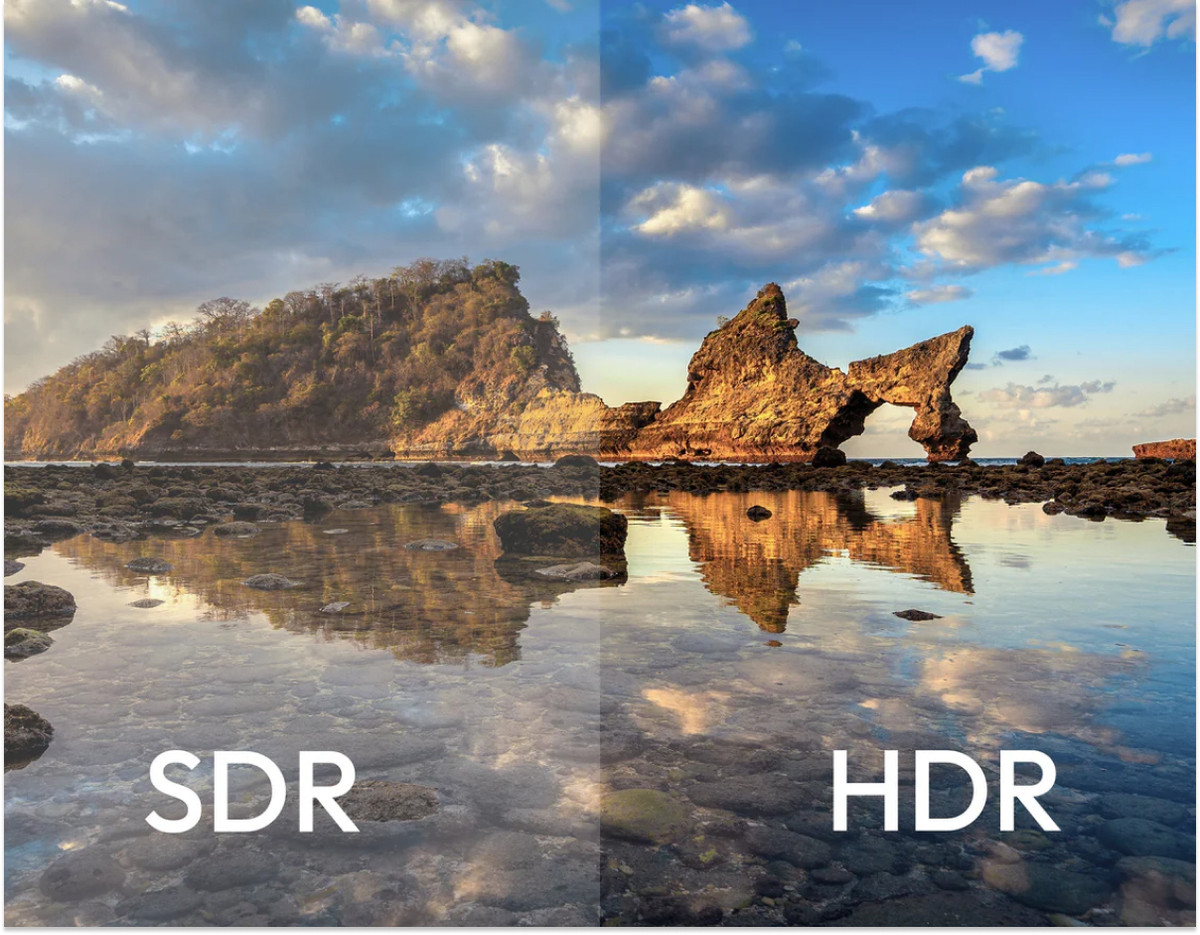
The most obvious and accurate way to evaluate HDR performance is on monitors with miniLED backlighting, thanks to their ample brightness reserve, or on OLED panels that can turn off pixels displaying black. On monitors with conventional LED backlighting, HDR is often noticeable only when directly comparing the image with and without it.
Source: 220-ELECTRONICS
To standardize HDR-capable displays, the VESA consortium introduced the DisplayHDR standard—a list of technical specifications guaranteed on certified displays. Below is a table outlining the requirements for each standard:
Certification level | Minimum peak brightness (cd/m²) | Color gamut (DCI‑P3 D65) | Contrast | Maximum black brightness (cd/m²) --- | --- | --- | --- | --- DisplayHDR 400 | 90 % | 1300:1 | 0.4 | DisplayHDR 500 | 95 % | 7000:1 | 0.1 | DisplayHDR 600 | 95 % | 8000:1 | 0.1 | DisplayHDR 1000 | 95 % | 30000:1 | 0.05 | DisplayHDR 1400 |
The graphics card forces the game to run at a certain frame rate, which can exceed or simply not match the monitor's refresh rate. When this happens, screen tearing occurs.
To eliminate tearing, there are frame synchronization technologies. On budget non-gaming monitors, there is usually no basic FreeSync, and to solve this problem in games, you will have to enable vertical sync - it limits the frame rate in the game to the monitor's refresh rate, which increases the delay of your actions in the game.
To solve this problem, FreeSync appeared - an AMD technology that does not simply limit performance, but adjusts the monitor's refresh rate to the frame rate in the game. It does not cause an increase in input delay. Despite the fact that the technology was developed by AMD, it is not closed and is also supported on NVIDIA graphics cards.
It has more advanced versions, Premium and Premium Pro: the first supports a monitor refresh rate of up to 200 Hz, and the second is certified for working with HDR content. Even the flagship version of the technology mainly works starting from a frequency of 48 Hz.
NVIDIA also has its own technologies to solve problems with screen tearing: G-Sync Compatible, G-Sync, and G-Sync Ultimate:
G-Sync Compatible. These are monitors on which AMD FreeSync is guaranteed to work with NVIDIA graphics cards. If a monitor does not have this label, it is useful to read reviews - often FreeSync "works" on the opponent's graphics accelerators without indicating "G-Sync compatible".
G-Sync. Displays have a built-in physical module from NVIDIA. Such monitors have a working range from a frequency of 1 Hz, as well as technology to reduce the trail from moving objects. These devices are significantly more expensive due to the cost of the module, as well as licensing fees for using the G-Sync technology.
G-Sync Ultimate. The company's flagship standard, focused on working with HDR. The module itself has more power than the regular G-Sync, and, according to the company's statement, has an even lower delay.
Selection criteria
In most categories, the most purchased monitors are represented by orders in the Onlíner Catalog from June 1 to September 20, 2026. The exception was professional and cyber sports models - in these sections, we selected devices based on their characteristics and reviews on the network.
Also, in each section, we left a link to the catalog, which filtered models for a specific usage scenario.
Affordable monitors for study and work
FHD:
Xiaomi Monitor A27i P27FBA-RAGL
Xiaomi Monitor A24i P24FBA-RAGL
ExeGate ProSmart EZ2707TA EX297649RUS
Samsung Essential S4 LS27D400GAIXCI
2K:
AOC Q27B3CF2
LG UltraFine 27U631A-B
ExeGate SmartView ES2707CA EX297307RUS
Dahua DHI-LM27-C301B
The primary task of a monitor intended for study and work is to provide comfort for the eyes and correctly display text and web content. To achieve this, it is essential to pay attention to the ratio of diagonal and resolution. For diagonals up to 25 inches, FHD resolution is sufficient. However, for 27-inch monitors, we recommend considering 2K resolution, as FHD on such a diagonal will cause text to blur and appear "grainy" to some, and the eyes will quickly become tired due to the insufficient detail of small objects.
If possible, it is worth considering models with a color depth of 8 bits. The number of available shades on 6-bit panels is simply not enough for a smooth gradient transition from one color to another. Today, budget 6-bit panels often feature FRC technology, which, thanks to rapid flickering, simulates color reproduction at the level of 8-bit displays.
More models up to 25 inches in this category can be found by following the link, and those with a 27-inch diagonal can be found here.
Source: Xiaomi
Xiaomi Monitor A24i P24FBA-RAGL (international version)
23.8", 1920x1080, 16:9, IPS, 100 Hz, 8-bit depth, 250 nit brightness, HDMI+DisplayPort
MSI Pro MP252 monitor
24.5", 1920x1080, 16:9, IPS, 100 Hz, 6-bit depth + FRC, 300 nit brightness, speakers, HDMI+DisplayPort
AOC Q27B35E monitor
27", 2560x1440, 16:9, IPS, 75 Hz, 8-bit depth, 300 nit brightness, HDR10, HDMI+DisplayPort
Which monitor to buy for gaming in FHD?
LG UltraGear 24G411A-B (review by link)
LG UltraGear 27G411A-B
Xiaomi Gaming Monitor G27i 2026 P27FDA-RGGL (international version)
Xiaomi Gaming Monitor G24i P24FCA-RGGL (international version)
MSI MAG 244F
Xiaomi Redmi Gaming Monitor G24 P24FCA-RG (Chinese version)
Full HD is currently the most popular resolution among monitors, confirmed by both Steam statistics and the Onlíner Catalog statistics, where they account for 50% of all orders over the past six months.
This is the minimum resolution for comfortable gaming today and the least demanding in terms of hardware - even the simplest configurations will suffice, although not always at maximum graphics settings.
If you're going to play strategy games or RPGs with a lot of text, it's worth prioritizing FHD monitors up to 25 inches. 27-inch models have a low pixel density per inch, which means the detail of small objects will suffer, and your eyes will get tired faster. However, if your priority is AAA titles from first and third person perspectives, buying a 27-inch FHD display is quite acceptable.
More monitors from this category can be found via the link.
The choice of buyers
Gaming monitor LG UltraGear 24G411A-B
23.8", 1920x1080, 16:9, IPS, 144 Hz, brightness 250 nits, HDR10, HDMI+DisplayPort
Gaming monitor Xiaomi Gaming Monitor G27i 2026 P27FDA-RGGL (international version)
27", 1920x1080, 16:9, IPS, 200 Hz, 8-bit depth, HDMI+DisplayPort
Gaming monitor MSI MAG 244F
23.8", 1920x1080, 16:9, IPS, 200 Hz, 8-bit depth + FRC, brightness 300 nits, HDMI+DisplayPort
Which monitor to buy for 2K gaming?
Xiaomi 2K Gaming Monitor G27Qi 2026 P27QDB-RGGL (international version) (review via the link)
LG UltraGear 27G610A-B
Xiaomi Redmi Gaming Monitor G27Q P27QDA-RG (Chinese version)
Xiaomi Redmi G Pro 27Q P27QDA-RGP (Chinese version)
Gigabyte GO27Q24A
ELSA EA272FX Pro
For not the first year, there has been a trend of growth in 2K resolution among ordered monitors - over the past six months, they have accounted for 38% of all sold models.
Thanks to the high pixel density per inch, 27-inch 2K monitors are more versatile than FHD with the same diagonal. Due to the higher pixel density, it is comfortable to both work and play on them.
It's worth remembering that for gaming in 2K resolution, you'll need fairly powerful hardware - at least a graphics card of the XX60 Ti/XT class. Moreover, games at this resolution are more voracious in terms of video memory - if you're just assembling a PC, we recommend paying attention to video cards with at least 12 GB.
More monitors from this category can be found via the link.
Source: Xiaomi
The choice of buyers